Run your first Temporal application with the TypeScript SDK
- Understand the application
- Run the application
- Simulate failures
In this tutorial, you'll run your first Temporal Application using the TypeScript SDK. You'll use the Web UI for state visibility, then explore how Temporal helps you recover from common failures.
- Explore Temporal's core terminology and concepts.
- Run a Temporal Workflow Application using a Temporal Cluster and the TypeScript SDK.
- Practice reviewing the state of the Workflow.
- Understand the inherent reliability of Workflow functions.
Prerequisites
Before starting this tutorial:
- Set up a local development environment for developing Temporal Applications with TypeScript
- Ensure you have Git installed to clone the project.
Application overview
The project simulates a money transfer application: withdrawals, deposits, and refunds. Money comes out of one account and goes into another. If the withdrawal succeeds but the deposit fails, the money needs to go back to the original account.
The following diagram illustrates what happens when you start the Workflow:
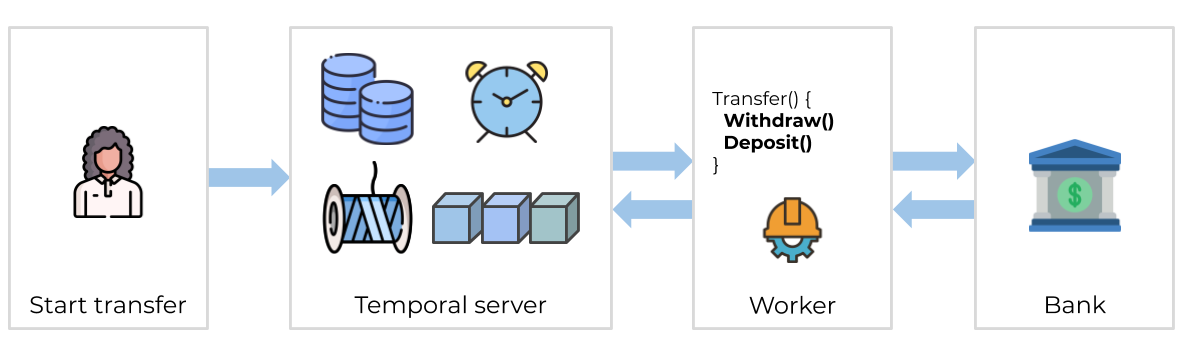
The Temporal Server doesn't run your code. Your Worker, Workflow, and Activity run on your infrastructure, along with the rest of your applications.
Download the example application
The application is available in a GitHub repository. Clone it:
git clone https://github.com/temporalio/money-transfer-project-template-ts/
cd money-transfer-project-template-ts
The repository is a GitHub Template, so you can clone it to your own account and use it as the foundation for your own Temporal application.
Workflow Definition
A Workflow Definition in TypeScript is a regular TypeScript function that accepts some input values:
import { proxyActivities } from '@temporalio/workflow';
import { ApplicationFailure } from '@temporalio/common';

import type * as activities from './activities';
import type { PaymentDetails } from './shared';

export async function moneyTransfer(details: PaymentDetails): Promise<string> {
  const { withdraw, deposit, refund } = proxyActivities<typeof activities>({
    retry: {
      initialInterval: '1 second',
      maximumInterval: '1 minute',
      backoffCoefficient: 2,
      maximumAttempts: 500,
      nonRetryableErrorTypes: ['InvalidAccountError', 'InsufficientFundsError'],
    },
    startToCloseTimeout: '1 minute',
  });

  let withdrawResult: string;
  try {
    withdrawResult = await withdraw(details);
  } catch (withdrawErr) {
    throw new ApplicationFailure(`Withdrawal failed. Error: ${withdrawErr}`);
  }

  let depositResult: string;
  try {
    depositResult = await deposit(details);
  } catch (depositErr) {
    let refundResult;
    try {
      refundResult = await refund(details);
      throw ApplicationFailure.create({
        message: `Failed to deposit into account ${details.targetAccount}. Money returned to ${details.sourceAccount}.`,
      });
    } catch (refundErr) {
      throw ApplicationFailure.create({
        message: `Failed to deposit into account ${details.targetAccount}. Refund failed.`,
      });
    }
  }
  return `Transfer complete (transaction IDs: ${withdrawResult}, ${depositResult})`;
}
The moneyTransfer function takes transaction details, executes Activities, and returns the result. The PaymentDetails input type is defined in shared.ts:
export type PaymentDetails = {
  amount: number;
  sourceAccount: string;
  targetAccount: string;
  referenceId: string;
};
It's a good practice to send a single, serializable data structure into a Workflow as its input.
Activity Definition
Activities are where you perform the business logic. The withdraw Activity calls a service to process the withdrawal:
import type { PaymentDetails } from './shared';
import { BankingService } from './banking-client';

export async function withdraw(details: PaymentDetails): Promise<string> {
  console.log(`Withdrawing $${details.amount} from account ${details.sourceAccount}.\n\n`);
  const bank1 = new BankingService('bank1.example.com');
  return await bank1.withdraw(
    details.sourceAccount,
    details.amount,
    details.referenceId
  );
}
The deposit Activity looks almost identical:
export async function deposit(details: PaymentDetails): Promise<string> {
  console.log(`Depositing $${details.amount} into account ${details.targetAccount}.\n\n`);
  const bank2 = new BankingService('bank2.example.com');
  // Uncomment lines 25-29 and comment lines 30-34 to simulate an unknown failure
  // return await bank2.depositThatFails(
  //   details.targetAccount,
  //   details.amount,
  //   details.referenceId
  // );
  return await bank2.deposit(
    details.targetAccount,
    details.amount,
    details.referenceId
  );
}
The commented lines are what you'll use later to simulate a failure.
Temporal Workflows have deterministic constraints - they need to be replayable. Use Activities for business logic and Workflows to coordinate.
Set the Retry Policy
If an Activity fails, Temporal Workflows automatically retry. At the top of the Workflow you'll see a Retry Policy:
const { withdraw, deposit, refund } = proxyActivities<typeof activities>({
  retry: {
    initialInterval: '1 second',
    maximumInterval: '1 minute',
    backoffCoefficient: 2,
    maximumAttempts: 500,
    nonRetryableErrorTypes: ['InvalidAccountError', 'InsufficientFundsError'],
  },
  startToCloseTimeout: '1 minute',
});
By default, Temporal retries failed Activities forever. This example sets a max of 500 attempts and marks InvalidAccountError and InsufficientFundsError as non-retryable.
In production you'd add more advanced logic - including a "human in the loop" step where someone is notified of refund issues and can intervene.
Get notified when we launch new educational content
New courses, tutorials, and learning resources - straight to your inbox.