Create audiobooks from text with OpenAI and Java
Build a robust text-to-speech system with OpenAI APIs and Temporal's error mitigation. Forget about manually checking statuses or handling errors. Just focus on converting text while Temporal makes sure everything runs smoothly. When complete, you'll be able to reliably convert any plain text file into an audiobook.
Introduction
For many people, audiobooks are a staple of daily life. Imagine turning your daily commute, workout sessions, or household chores into opportunities to catch up on all your reading - not just books. You can grab text from emails, from the web, or even that report you need to "read" for work. With the rise of advanced text-to-speech (TTS) technology, it's not just possible, it's quick to build in Java with simple APIs.
Companies like OpenAI have revolutionized speech synthesis. They created voices that sound like humans and not androids and released affordable APIs. Using these large language models (LLMs), you can enjoy warm, nuanced narration.
In this tutorial, you'll use LLM voices to transform any text into audiobooks. You'll build a robust text-to-speech system with OpenAI APIs and Temporal's error mitigation.
Prerequisites
You can build the project by following this tutorial, or just grab the ready-to-go source from its GitHub repo. Here's what you need to get going:
- A local Java development environment: Follow "Set up a local development environment" so you're ready to build Temporal applications with Java. Ensure a local Temporal Service is running and that you can access the Temporal Web UI from port
8080. - Basic understanding of the Temporal Java SDK: Work through the Hello World in Java tutorial. This covers the basics of getting a Temporal Java SDK project up and running.
- OpenAI API access: Sign up for your OpenAI API developer account and create a bearer token. You need this token to access OpenAI services for text-to-speech conversion.
This tutorial is written to be run on a single system, with a single Worker, using the local file system. This is a tutorial project and its implementation is suited for personal and hobbyist use. In production, you wouldn't read or write from a single database file or system.
Durable execution refers to maintaining state and progress even in the face of failures, crashes, or server outages. For durable execution, you must be able to rebuild progress state and store information somewhere more reliable. If you expand on this project, consider an API-based Cloud storage solution.
For single-host work, check out this sample, which shows how to pick up work off a shared Task Queue to start a Workflow, and then use a host-specific Task Queue for the following Activity tasks.
Create your Java project structure
Set up your source code folder hierarchy with this directory creation command:
mkdir -p TTSWorker/src/main/java/ttsworker
Your directory structure should now look like this:
TTSWorker
└── src
    └── main
        └── java
            └── ttsworker
You can check it with the Unix tree command. In your project root folder, create a build.gradle file and add the following contents. Feel free to swap in Maven if you prefer:
group 'ttspackage'; version '0.0.1'
repositories { mavenCentral() }
apply plugin: 'java'
sourceSets.main.java.srcDirs 'src'

dependencies {
    implementation 'io.temporal:temporal-sdk:1.31.0'
    implementation 'org.slf4j:slf4j-nop:2.0.17' // logging suppression
    implementation 'commons-io:commons-io:2.20.0'
    implementation 'com.squareup.okhttp3:okhttp:5.2.0'
    implementation 'org.json:json:20250517'
}

// Run the App
task run(type: JavaExec) {
    classpath = sourceSets.main.runtimeClasspath
    mainClass = 'ttspackage.TTSWorkerApp'
    standardOutput = System.out
}
Your dependencies include Temporal's Java SDK, and a few basic libraries:
- com.squareup.okhttp3: Basic HTTP client for network requests
- org.json:json: Parse and manipulate JSON data
- commons-io: Perform file tasks with common input/output routines
- slf4j-nop: Minimizes unnecessary log output
- temporal-sdk: Provides support for building Temporal applications in Java
The run task starts your TTS application.
Create your OpenAI conversion code
Create an interface-implementation pair of files named TTSActivities.java and TTSActivitiesImpl.java in src/main/java/ttsworker. This class is responsible for the text-to-speech work in your project.
package ttspackage;

import io.temporal.activity.ActivityInterface;
import java.nio.file.Path;
import java.util.List;

@ActivityInterface
public interface TTSActivities {
    public List<String> readFile(String inputPath);
    public Path createTemporaryFile();
    public void process(String chunk, Path outputPath);
    public String moveOutputFileToPlace(Path tempPath, String inputPath);
}
package ttspackage;

import io.temporal.activity.ActivityInterface;
import io.temporal.failure.ApplicationFailure;
import java.io.*;
import java.nio.file.*;
import java.util.*;
import java.util.List;
import java.util.logging.Logger;
import okhttp3.*;
import org.apache.commons.io.FilenameUtils;
import org.json.JSONObject;

public class TTSActivitiesImpl implements TTSActivities {
    private String bearerToken = null;

    TTSActivitiesImpl(String bearerToken) {
        this.bearerToken = bearerToken;
    }

    ApplicationFailure fail(String reason, String issue) {
        return ApplicationFailure.newFailure(reason, issue);
    }

    @Override
    public List<String> readFile(String inputPath) {
        Path canonicalPath;

        try {

            if (inputPath == null || inputPath.isEmpty() || !inputPath.endsWith(".txt")) {
                throw fail("Invalid path", "MALFORMED_INPUT");
            }

            if (inputPath.startsWith("~")) {
                String home = System.getProperty("user.home");
                inputPath = home + inputPath.substring(1);
            }

            canonicalPath = Paths.get(inputPath)
                .toAbsolutePath().normalize()
                .toRealPath(LinkOption.NOFOLLOW_LINKS);

            if (!Files.exists(canonicalPath) ||
                !Files.isReadable(canonicalPath) ||
                Files.size(canonicalPath) == 0) {
                throw fail("Invalid path", "MALFORMED_INPUT");
            }

        } catch (InvalidPathException | IOException e) {
            throw fail("Invalid path", "MALFORMED_INPUT");
        }

        String content;
        try {
            content = Files.readString(canonicalPath).trim();
        } catch (IOException e) {
            throw fail("Invalid content", "MISSING_CONTENT");
        }

        int MAX_TOKENS = 512;
        float AVERAGE_TOKENS_PER_WORD = 1.33f;

        List<String> chunks = new ArrayList<>();
        String[] words = content.split("\\s+");
        StringJoiner chunk = new StringJoiner(" ");

        for (String word : words) {
            if ((chunk.length() + word.length()) * AVERAGE_TOKENS_PER_WORD <= MAX_TOKENS) {
                chunk.add(word);
            } else {
                chunks.add(chunk.toString());
                chunk = new StringJoiner(" ");
                chunk.add(word);
            }
        }

        if (chunk.length() > 0) {
            chunks.add(chunk.toString());
        }

        return chunks;
    }

    @Override
    public Path createTemporaryFile() {
        try {
            Path tempFile = Files.createTempFile(null, null);
            return tempFile;
        } catch (IOException | IllegalArgumentException | SecurityException e) {
            fail("Unable to create temporary work file", "FILE_ERROR");
        }
        return null;
    }

    byte[] textToSpeech(String text) throws IOException {
        String apiEndpoint = "https://api.openai.com/v1/audio/speech";

        OkHttpClient client = new OkHttpClient();

        JSONObject json = new JSONObject();
        json.put("model", "tts-1");
        json.put("input", text);
        json.put("voice", "nova"); // see https://platform.openai.com/docs/guides/text-to-speech/voice-options
        json.put("response_format", "mp3");

        MediaType mediaType = MediaType.get("application/json; charset=utf-8");
        RequestBody body = RequestBody.create(json.toString(), mediaType);

        Request request = new Request.Builder()
            .url(apiEndpoint)
            .post(body)
            .addHeader("Authorization", "Bearer " + bearerToken)
            .build();

        try (Response response = client.newCall(request).execute()) {
            if (!response.isSuccessful()) {
                throw new IOException("Unexpected code " + response);
            }
            return response.body().bytes();
        }
    }

    @Override
    public void process(String chunk, Path outputPath) {
        byte[] audio;

        try {
            audio = textToSpeech(chunk);
        } catch (IOException e) {
            throw new RuntimeException(e);
        }

        try {
            Files.write(outputPath, audio,
                            java.nio.file.StandardOpenOption.CREATE,
                            java.nio.file.StandardOpenOption.APPEND);
        } catch (IOException e) {
            throw fail("Unable to write to output file", "FILE_ERROR");
        }
    }

    @Override
    public String moveOutputFileToPlace(Path tempPath, String inputPath) {
        Path newPath = null;
        String extension = ".mp3";
        try {
            Path canonicalPath = Paths.get(inputPath)
                .toAbsolutePath().normalize()
                .toRealPath(LinkOption.NOFOLLOW_LINKS);
            String baseName = FilenameUtils.getBaseName(canonicalPath.toString());
            Path parentDir = canonicalPath.getParent();
            newPath = parentDir.resolve(Paths.get(baseName + extension));
            int suffixCounter = 1;
            while (Files.exists(newPath)) {
                String newFileName = baseName + "-" + suffixCounter + extension;
                newPath = parentDir.resolve(newFileName);
                suffixCounter += 1;
            }
            Files.move(tempPath, newPath, StandardCopyOption.REPLACE_EXISTING);
        } catch (InvalidPathException | IOException e) {
            throw fail("Unable to move output file to destination", "FILE_ERROR");
        }
        return newPath.toString();
    }
}
Activities, like the TTSActivities class, handle potentially unreliable parts of your code, such as calling APIs or working with file systems. Temporal uses Activities for any action that is prone to failure, allowing them to be retried. Activities add check-in points for your application state in your Event History. When retried, an Activity picks up state from just before it was first called, so it's like the failed attempt never happened.
The TTSActivities class handles text-to-speech operations with the following methods:
readFile: Reads from the specifiedfileInputPathand returns the contents as a chunked list of strings, for well-sized API calls.createTemporaryFile: Creates a temporary file for audio output in a designated folder that is typically cleaned up on system reboots.process: Sends a text chunk to OpenAI for processing, retrieves the TTS audio segment, and appends it to the output file.moveOutputFileToPlace: Moves an audio file to a safe, versioned location in the same folder as the original text file.
Here is how the Activities help the conversion process:
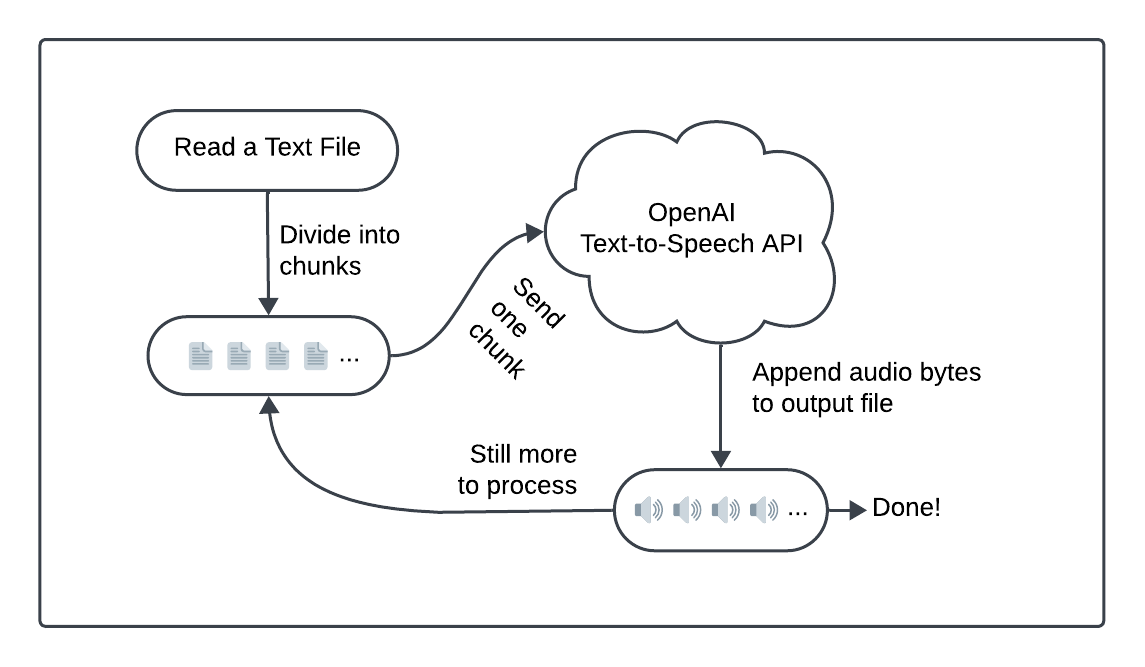
Prepare your text with readFile
The readFile Activity reads and processes text from a file. Before and during the read, it performs a series of safety checks. If it encounters any file system issues, it throws an application error.
The following code appears at the end of the Activity. It splits the text into "chunks", each containing part of the source material:
// ...
        int MAX_TOKENS = 512;
        float AVERAGE_TOKENS_PER_WORD = 1.33f;

        List<String> chunks = new ArrayList<>();
        String[] words = content.split("\\s+");
        StringJoiner chunk = new StringJoiner(" ");

        for (String word : words) {
            if ((chunk.length() + word.length()) * AVERAGE_TOKENS_PER_WORD <= MAX_TOKENS) {
                chunk.add(word);
            } else {
                chunks.add(chunk.toString());
                chunk = new StringJoiner(" ");
                chunk.add(word);
            }
        }

        if (chunk.length() > 0) {
            chunks.add(chunk.toString());
        }

        return chunks;
A typical English word uses 1.33 OpenAI tokens, which is how this code defines the AVERAGE_TOKENS_PER_WORD constant. This code creates chunks with approximately 512 tokens for each API request.
Build a temporary file with createTemporaryFile
The createTemporaryFile Activity requests that the system create a new temporary file. This file stores intermediate results so your work won't affect the main file system:
// ...
    public Path createTemporaryFile() {
        try {
            Path tempFile = Files.createTempFile(null, null);
            return tempFile;
        } catch (IOException | IllegalArgumentException | SecurityException e) {
            fail("Unable to create temporary work file", "FILE_ERROR");
        }
        return null;
    }
Convert text to audio with process
The process Activity handles text-to-speech work. Each time it's called, it sends a chunk of text to the textToSpeech method and appends those results to your output file. Should the text-to-speech conversion request fail, Temporal can retry the request:
// ...
    public void process(String chunk, Path outputPath) {
        byte[] audio;

        try {
            audio = textToSpeech(chunk);
        } catch (IOException e) {
            throw new RuntimeException(e);
        }

        try {
            Files.write(outputPath, audio,
                            java.nio.file.StandardOpenOption.CREATE,
                            java.nio.file.StandardOpenOption.APPEND);
        } catch (IOException e) {
            throw fail("Unable to write to output file", "FILE_ERROR");
        }
    }
The conversion code lives in its own method. It uses the bearer token, stored within the TTSActivities class. The textToSpeech method calls out to OpenAI to convert a String into a byte[] array. It creates the request body, and performs a POST operation to an OpenAI endpoint:
// ...
    byte[] textToSpeech(String text) throws IOException {
        String apiEndpoint = "https://api.openai.com/v1/audio/speech";

        OkHttpClient client = new OkHttpClient();

        JSONObject json = new JSONObject();
        json.put("model", "tts-1");
        json.put("input", text);
        json.put("voice", "nova"); // see https://platform.openai.com/docs/guides/text-to-speech/voice-options
        json.put("response_format", "mp3");

        MediaType mediaType = MediaType.get("application/json; charset=utf-8");
        RequestBody body = RequestBody.create(json.toString(), mediaType);

        Request request = new Request.Builder()
            .url(apiEndpoint)
            .post(body)
            .addHeader("Authorization", "Bearer " + bearerToken)
            .build();

        try (Response response = client.newCall(request).execute()) {
            if (!response.isSuccessful()) {
                throw new IOException("Unexpected code " + response);
            }
            return response.body().bytes();
        }
    }
When creating the HTTP request body, customizable endpoint options shape the way your audio gets built:
- model (required): You'll use the basic low-latency 'tts-1' model in this project.
- input (required): The maximum length of this string is set at 4096 characters.
- voice (required): The 'nova' voice has a high energy "lively tone".
- response_format: You'll use the highly portable mp3 output format.
Find a location for your output file
The moveOutputFileToPlace Activity handles this process by versioning the output path to prevent overwriting an existing file:
// ...
    public String moveOutputFileToPlace(Path tempPath, String inputPath) {
        Path newPath = null;
        String extension = ".mp3";
        try {
            Path canonicalPath = Paths.get(inputPath)
                .toAbsolutePath().normalize()
                .toRealPath(LinkOption.NOFOLLOW_LINKS);
            String baseName = FilenameUtils.getBaseName(canonicalPath.toString());
            Path parentDir = canonicalPath.getParent();
            newPath = parentDir.resolve(Paths.get(baseName + extension));
            int suffixCounter = 1;
            while (Files.exists(newPath)) {
                String newFileName = baseName + "-" + suffixCounter + extension;
                newPath = parentDir.resolve(newFileName);
                suffixCounter += 1;
            }
            Files.move(tempPath, newPath, StandardCopyOption.REPLACE_EXISTING);
        } catch (InvalidPathException | IOException e) {
            throw fail("Unable to move output file to destination", "FILE_ERROR");
        }
        return newPath.toString();
    }
The code iterates through potential new paths, adding suffix counters (-1, -2, etc.) as needed to avoid path conflicts. Once found, it uses File.move to bring the file out of the temporary folder and into place.
Define your Workflow
You've seen the pieces that perform the conversion work but you haven't tied the process together. In this section, you'll build a Temporal Workflow to process a text-to-speech conversion from start to finish. Workflows create the overall flow of your application's business process.
Create an interface-implementation pair of files named TTSWorkflow.java and TTSWorkflowImpl.java in src/main/java/ttsworker:
package ttspackage;

import io.temporal.workflow.QueryMethod;
import io.temporal.workflow.WorkflowInterface;
import io.temporal.workflow.WorkflowMethod;

@WorkflowInterface
public interface TTSWorkflow {
    @WorkflowMethod
    public String startWorkflow(String filePathString);

    @QueryMethod
    public String fetchMessage();
}
package ttspackage;

import io.temporal.activity.ActivityOptions;
import io.temporal.common.RetryOptions;
import io.temporal.client.WorkflowStub;
import io.temporal.workflow.*;
import java.io.IOException;
import java.nio.file.Path;
import java.time.Duration;
import java.util.List;
import org.slf4j.Logger;

public class TTSWorkflowImpl implements TTSWorkflow {
    public TTSWorkflowImpl() { }

    private static final Logger logger = Workflow.getLogger(TTSWorkflowImpl.class);
    private String message = "Conversion request received";

    private ActivityOptions activityOptions = ActivityOptions.newBuilder().setScheduleToCloseTimeout(Duration.ofSeconds(120)).build();
    private TTSActivities encodingStub = Workflow.newActivityStub(TTSActivities.class, activityOptions);

    public String fetchMessage() {
        return message;
    }

    public String startWorkflow(String fileInputPath) {
        List<String> chunks = encodingStub.readFile(fileInputPath);
        int chunkCount = chunks.size();
        logger.info("File content has " + chunkCount + " chunk(s) to process.");

        Path tempOutputPath = encodingStub.createTemporaryFile();
        logger.info("Created temporary file for processing: " + tempOutputPath.toString());

        for (int index = 0; index < chunkCount; index += 1) {
            message = "Processing part " + (index + 1) + " of " + chunkCount;
            logger.info(message);
            encodingStub.process(chunks.get(index), tempOutputPath);
        }
        String outputPath = encodingStub.moveOutputFileToPlace(tempOutputPath, fileInputPath);
        message = "Processing of file is done " + outputPath;
        logger.info("Output file: " + outputPath);
        return outputPath;
    }
}
The TTSWorkflow class defines a complete business logic flow, in this case transforming the text within a file pointed to by the input path parameter, into spoken audio. This code reads the source file, creates the temporary file, processes each chunk, and finally moves the output file into place. The function returns the file output path for the generated mp3 results.
Workflows coordinate Activities, which are the methods you created in the previous section. You use Activities to make API requests, access the file system, invoke LLMs and other AI services, or perform other non-deterministic operations. Every Workflow must be deterministic so you perform all your non-deterministic work in Activities. This separation is also what makes Temporal a strong fit for AI applications: LLM calls, tool use, and agent steps are non-deterministic by nature, so you place them in Activities while the Workflow reliably orchestrates the sequence.
This class creates ActivityOptions, which set the policies Temporal uses for retrying failed Activities. Then it builds the encodingStub, which allows your application to run Activities as they are managed by the Temporal system.
fetchMessage: This is a Temporal Query method. Queries can "peek" at running processes and fetch information about how that work is proceeding. This method returns the status, stored in themessageinstance variable.startWorkflow: Every Workflow has one entry point, annotated with@WorkflowMethodin the class interface. It defines a complete business logic flow.
Create your Worker
Add TTSWorkerApp.java in src/main/java/ttsworker with the following file contents:
package ttspackage;

import io.temporal.client.WorkflowClient;
import io.temporal.serviceclient.WorkflowServiceStubs;
import io.temporal.worker.Worker;
import io.temporal.worker.WorkerFactory;
import java.util.logging.Logger;

public class TTSWorkerApp {
    public static String sharedTaskQueue = "tts-task-queue";
    private static final Logger logger = Logger.getLogger(TTSWorkerApp.class.getName());

    public static void main(String[] args) {
        String bearerToken = System.getenv("OPEN_AI_BEARER_TOKEN");
        if (bearerToken == null || bearerToken.isEmpty()) {
            logger.severe("Environment variable OPEN_AI_BEARER_TOKEN not found");
            System.exit(1);
        }
        bearerToken = bearerToken.trim();
        bearerToken = bearerToken.replaceAll("[\\P{Print}]", "");

        WorkflowServiceStubs service = WorkflowServiceStubs.newLocalServiceStubs();
        WorkflowClient client = WorkflowClient.newInstance(service);
        WorkerFactory factory = WorkerFactory.newInstance(client);
        Worker worker = factory.newWorker(sharedTaskQueue);
        worker.registerWorkflowImplementationTypes(TTSWorkflowImpl.class);
        worker.registerActivitiesImplementations(new TTSActivitiesImpl(bearerToken));
        factory.start();
    }
}
Every Worker polls Task Queues to pick up Workflow and Activity Tasks. The Task Queue for this project is named tts-task-queue. You'll use this queue to submit conversion requests.
A few more things about this code:
- As a standalone application, this Worker has a
mainmethod. - The app starts by checking for an OpenAI bearer token and stores it as a static member of the
TTSActivitiesImplclass. - It builds a Client, a class that can communicate with the Temporal service, and passes it to a WorkerFactory. The factory builds a Worker and the code runs the factory, bringing the Worker online and ready to start processing Tasks.
Your complete project structure will now look like this:
TTSWorker
├── build.gradle
└── src
    └── main
        └── java
            └── ttsworker
                ├── TTSActivities.java
                ├── TTSActivitiesImpl.java
                ├── TTSWorkerApp.java
                ├── TTSWorkflow.java
                └── TTSWorkflowImpl.java
Run the Worker
Follow these steps to get your Worker up and running.
Run the Development Server
Make sure the Temporal development server is running and using a persistent store. Interrupted work can be picked up and continued without repeating steps, even if you experience server interruptions:
temporal server start-dev \
    --ui-port 8080 \
    --db-filename /path/to/your/temporal.db
Once running, connect to the Temporal Web UI and verify that the server is working.
Instantiate Your Bearer Token
Create an environment variable called OPEN_AI_BEARER_TOKEN to configure your OpenAI credentials. If you set this value using a shell script, make sure to source the script so the variable carries over past the script execution.
When using your application, you must set your OPEN_AI_BEARER_TOKEN environment variable in the same shell before execution. The application checks for the token and if it's not set, it will error.
Run the Worker application
- Build the Worker app:
gradle build - Start the app running:
gradle run
If the Worker can't fetch a bearer token from the shell environment, it will fail loudly at launch. This early check prevents you from running jobs and waiting to find out that you forgot to set the bearer token.
Submit narration jobs
Use the Temporal CLI tool to build audio from text files. Open a new terminal window. You'll use the Workflow execute subcommand to watch the execution in real time from your command line:
temporal workflow execute \
    --type TTSWorkflow \
    --task-queue tts-task-queue \
    --input '"/path/to/your/text-file.txt"' \
    --workflow-id "your-workflow-id"
- type: The name of this text-to-speech Workflow is
TTSWorkflow. - task-queue: This Worker polls the "tts-task-queue" Task Queue.
- input: Pass a quoted JSON string with a
/path/to/your/input/text-file. - workflow-id: Set a descriptive name for your Workflow Id.
For example, you might run:
temporal workflow execute \
    --type TTSWorkflow \
    --task-queue tts-task-queue \
    --input '"~/Desktop/chapter-1.txt"' \
    --workflow-id "chapter-1-tts"
Find your output file
Your output is collected in a system-provided temporary file. Your generated MP3 audio is moved into the same folder as your input text file. It uses the same name replacing the txt extension with mp3. If an output file already exists, the project versions it to prevent name collisions.
The TTSWorkflow returns a string, the /path/to/your/output/audio-file. Check the Web UI Input and Results section after the Workflow completes.
- Do not modify your input or output files while the Workflow is running.
- The Workflow fails if you don't pass a valid text file named with a
txtextension.
Check your progress
This project includes a Query to check progress during long processes. Run it in a separate terminal window or tab:
temporal workflow query \
    --type fetchMessage \
    --workflow-id "your-workflow-id"
The Query returns a status reporting how many chunks have completed. For example:
% workflow query --type fetchMessage --workflow-id chapter-1
Query result:
  QueryResult  "Processing part 8 of 47"
%
This Workflow has completed about 17% of its work.
Validate your audio output
The open source checkmate app validates MP3 files for errors.
$ mpck -v chapter-1.mp3

SUMMARY: chapter-1.mp3
    version                       MPEG v2.0
    layer                         3
    bitrate                       160000 bps
    samplerate                    24000 Hz
    frames                        23723
    time                          9:29.352
    unidentified                  0 b (0%)
    stereo                        yes
    size                          11120 KiB
    ID3V1                         no
    ID3V2                         no
    APEV1                         no
    APEV2                         no
    last frame
        offset                    11386560 b (0xadbec0)
        length                    480
    errors                        none
    result                        Ok
With no errors found, your audio is ready to use. Fire up your favorite player and listen to your creation.
Conclusion
In this tutorial, you created an OpenAI solution that converts text files into audio. You used Temporal error mitigation to make sure that failed API requests could be retried and catastrophic events could be recovered. With just a few source files, you created a complete working solution, building a durable, reliable system that builds audiobooks from simple text files.
Now that you've completed this tutorial, check out some other great Temporal Java projects or learn more about Temporal by taking our free courses. We provide hands-on projects for supported SDK languages including Java, Go, Python, TypeScript, and PHP.
Get notified when we launch new educational content
New courses, tutorials, and learning resources - straight to your inbox.